


Signal Private Messenger
Signal Foundation
I installed Signal Private Messenger to see whether its privacy-first approach holds up in ordinary communication, not just in a polished description. My overall impression is that it is a focused messaging app for people who want private conversations without giving up the familiar basics: one-to-one chats, group discussions, voice calls, video calls, and media sharing. It is free, rated for Everyone, and developed by Signal Foundation, but its real appeal is not simply that it costs nothing. The important question is whether its controls and daily habits make sense for you.
Signal sits in the communication category, yet it feels more deliberate than many mainstream alternatives. Instead of surrounding messaging with a large social platform, shopping features, public feeds, games, or a broad ecosystem, it keeps the conversation at the center. That narrow focus can be refreshing. It can also be inconvenient if your friends, relatives, or work contacts already live in another service and do not want to install another app.
What makes Signal worth trusting, and where that trust needs limits
The app’s reputation is closely tied to privacy, but I prefer to judge it through visible choices rather than slogans. Signal Foundation is the developer, and the app has reached over 100 million installs with an average rating of 4.6 from around 2.8 million ratings. Those figures suggest that it is no longer a niche tool used only by privacy enthusiasts. Still, popularity by itself does not prove that an app is the right fit for every conversation.
Related News

CallApp: Redefining Caller ID and Blocking in Mobile Ecosystems

KakaoTalk: The Strategic Powerhouse Shaping Mobile Communication
What I noticed first is how little the interface tries to distract me from the actual exchange. The design is familiar enough that I did not need a tutorial, but the app repeatedly brings attention back to identity, message handling, and conversation settings. That creates a different mindset from services where messaging is only one part of a much larger account.
Signal is free to download and use, with optional in-app purchases listed at $1.99 per item. I would not choose it because of those purchases, and they do not define the normal messaging experience. The more meaningful cost is social: asking contacts to join, explaining why you prefer it, and accepting that some people will stay with the service they already use.
Related News

Instagram Is No Longer a Photo App. It Is an Attention Engine

Microsoft Teams Mobile: When Collaboration Becomes Navigation

How the NFL App Adapts to Android and iOS Updates

Temu: Elevate Your Shopping Experience to Billionaire Status

Why Traffic Rider Works Best as a Precision Reflex Game

How Google’s Find Hub Transforms Everyday Searches
The current version is 7.68.5, and the app supports Android 6.0 or later. That makes compatibility fairly broad for people using older Android devices, although I would still check the operating system on a particular phone before planning a switch. On iOS, the experience follows the same privacy-oriented idea, but device settings and system behavior can naturally differ from Android.
Privacy is most useful when it changes everyday behavior
In my experience, the strongest part of Signal is not one dramatic switch. It is the way several small decisions work together. I can think more carefully about who receives a message, how long a sensitive exchange should remain available, and whether a contact is really the person I intended to reach. That is more practical than simply installing a private messenger and then using it exactly like an ordinary SMS replacement.
For example, I would use Signal for a family group discussing travel documents, a private conversation about a medical appointment, or a message containing temporary access information. I would still avoid treating any phone as a perfect vault. A recipient can copy information, photograph a screen, forward details outside the app, or lose control of their own device. Privacy controls reduce exposure; they do not remove the need for judgment.
Gallery
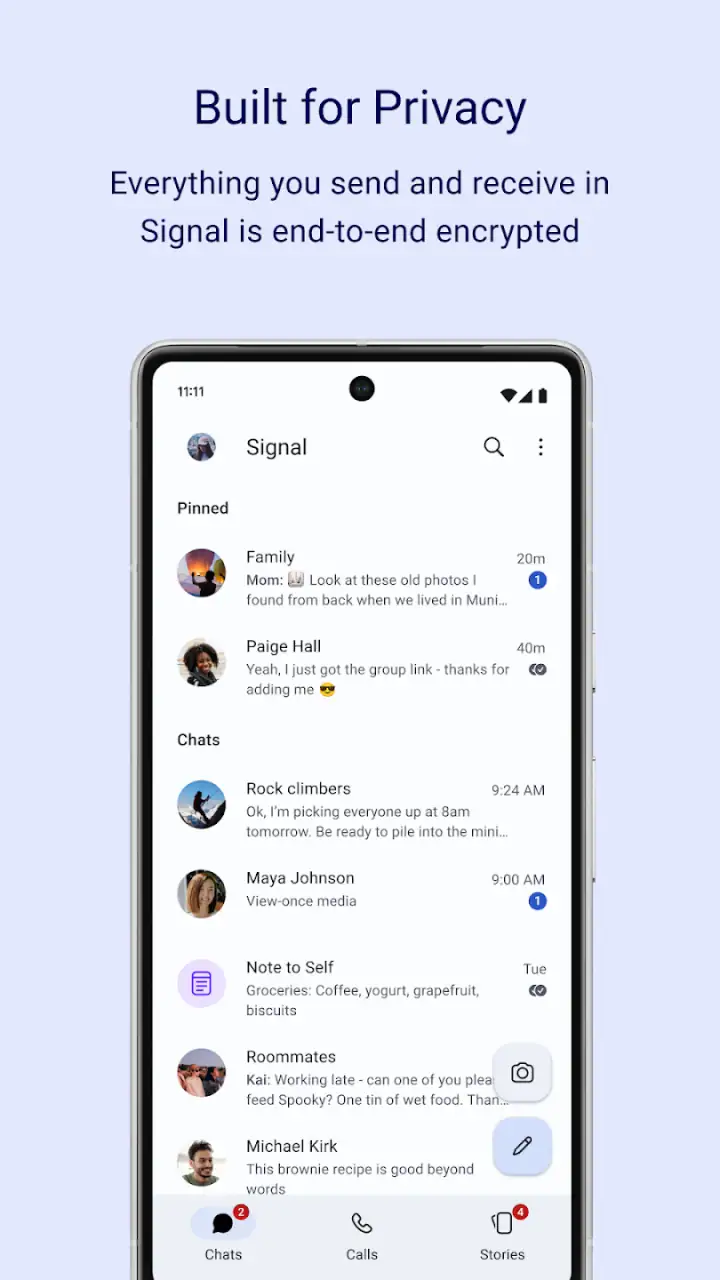
That distinction matters because people sometimes expect a secure messenger to solve every human problem around communication. It cannot tell whether a contact is trustworthy, whether a message was sent to the wrong person, or whether a sensitive detail should have been written down at all. Signal gives me better tools for making those decisions, but I remain responsible for using them carefully.
Identity checks are more important than most new users expect
One of the less obvious habits I recommend is verifying important contacts instead of assuming that a familiar name is enough. In a normal address book, several people can share a first name, and a compromised or replaced account can create confusion. When a conversation involves money, personal records, legal matters, or private family information, I would compare the contact through another trusted channel before continuing.
This is a small amount of friction, and that is exactly why many people skip it. Signal is most valuable when I accept that a little inconvenience can prevent a much larger mistake. I would not perform a formal identity check for every casual message, but I would make it part of my routine for high-consequence conversations.
The same principle applies when changing phones or reinstalling the app. A messaging account is not just a colorful chat list; it is part of a communication chain involving contacts, devices, and recovery decisions. Before moving to a new phone, I would review the app’s transfer and registration prompts carefully rather than tapping through them quickly. That preparation is especially important if the conversations matter for work or personal records.
Controls that help me decide how much remains visible
Signal gives users choices around message handling that are easy to overlook when a conversation is moving quickly. Disappearing messages are useful when the information has a short life, such as a temporary meeting detail or a one-time plan. I would not enable them automatically for every chat, because some conversations need a durable reference and repeated searching.
The practical trick is to match the setting to the purpose of the conversation. A short-lived group coordination chat benefits from less clutter and less lingering information. A household thread containing appliance instructions or travel confirmations may be more useful when it remains available. The best setting is not the most private-looking one; it is the one that fits the consequences of losing the history.
I also found it helpful to separate “private” from “invisible.” A disappearing message can reduce the amount of information stored in a conversation, but it cannot guarantee that nobody has seen or preserved it. If I send a photo of an identification document, I should assume the recipient can retain it even if the original message later disappears. That is a limitation of human communication, not something an app can completely control.
Notifications deserve the same attention. A private chat can become less private if a lock-screen preview displays the contents while the phone is unattended. I would review notification behavior at the operating-system level, especially on a shared desk, family tablet, or work phone. This is one of the most useful setup steps because it protects against a very ordinary source of accidental exposure.
How I would handle a sensitive everyday situation
Imagine that I am arranging care for an older relative. Several family members need updates, but not everyone should receive every detail. I would create a focused group for the people involved, keep the messages limited to practical information, and avoid placing medical documents in a broad conversation. If a detail only matters for a few hours, I would consider a disappearing-message setting. If a decision needs to be remembered, I would keep a clear summary and remove unnecessary personal details.
Before sharing a document, I would confirm the recipients and consider whether a cropped image or a written summary is enough. I would also avoid sending a password or access code in the same conversation as the account it protects. Signal makes private communication more comfortable, but it does not replace basic separation of sensitive information.
This workflow shows where the app is genuinely useful: it gives me a quieter place to discuss personal matters and lets me make more deliberate choices. It also shows where the responsibility remains mine. The app can help limit the trail, but it cannot judge the context for me.
What the app feels like beside familiar alternatives
Compared with standard SMS, Signal is a much better choice for conversations where privacy and message controls matter. SMS is widely available and requires little coordination, which is its main advantage, but it is not designed around the same kind of private conversation experience. If everyone involved already uses SMS and refuses another app, Signal cannot solve that adoption problem by itself.
Compared with large all-in-one messaging platforms, Signal feels less crowded. That is an advantage when I want a conversation without public profiles, entertainment features, or a large service ecosystem competing for attention. The trade-off is that people who rely on integrated payments, business pages, extensive communities, or broad social discovery may find Signal too narrow.
It is also different from a workplace collaboration tool. Signal can be useful for a small private team or a sensitive one-off discussion, but I would not treat it as a replacement for structured project management, searchable company knowledge, shared calendars, or formal document workflows. A privacy-focused chat app and a business workspace solve different problems.
The biggest comparison point is not the interface; it is the network of people around me. A messenger becomes useful when the right contacts are present. If my entire social circle is committed to another platform, moving only myself may create a second inbox rather than a better communication system. I would start with the people and conversations that actually benefit from Signal instead of trying to migrate everyone at once.
Where the experience can be frustrating
The first limitation is adoption. I may appreciate the controls, but a conversation cannot happen in Signal if the other person will not join. Inviting contacts, explaining the reason, and maintaining two messaging apps can become tiring. For a user who wants one universal inbox, this alone may be enough reason to stay with a more widely used alternative.
The second limitation is that privacy can introduce extra decisions. Should a message disappear? Should I verify the contact? Should the notification show a preview? Should I keep a conversation for reference? These are good questions, but they are still questions. Someone looking for a completely effortless messenger may find the deliberate approach slower than expected.
The third limitation is that secure habits can be undermined by the surrounding device. A strong chat setting does not help much if the phone is unlocked, shared with other people, backed up carelessly, or displaying private previews. I would therefore treat device security, screen locking, and notification review as part of using Signal responsibly.
I would also skip it as my only messenger if my priority is a broad entertainment and social ecosystem. Signal is not the best match for someone who wants a public audience, creator tools, shopping integration, or a single app that handles every online activity. Its restraint is a feature for me, but it is a limitation for someone seeking variety.
Practical setup choices I would make first
After installation, I would begin with the basics rather than immediately importing every conversation or inviting my entire address book. I would set a screen lock on the phone, inspect notification previews, and decide which conversations deserve disappearing messages. Then I would identify the contacts with whom privacy matters most and explain the reason for using Signal in plain language.
For important conversations, I would confirm identity through a separate method. I would avoid sending unnecessary personal documents, keep temporary information temporary, and assume that recipients can preserve anything they see. These habits make the app’s controls more meaningful than simply leaving every option at its default.
I would also plan for account continuity. If I change phones, lose access to a device, or reinstall the app, I would read each registration and transfer prompt carefully. I would not assume that every old conversation will behave exactly like a conventional cloud-based inbox. The safest approach is to decide in advance which information must be retained and which information should not be treated as a permanent archive.
For group chats, I would keep membership narrow and review who is included before sharing anything sensitive. A group is only as private as its least careful participant. That sounds obvious, but group conversations move quickly, and a broad audience can turn a minor mistake into a serious one.
Who should use it, and who should choose something else?
I would recommend Signal to people who want a dedicated private messenger, are willing to persuade key contacts to join, and appreciate having more say over message visibility and contact verification. It is especially suitable for personal conversations that do not belong in a public social network or a large commercial ecosystem.
It is also a good choice for someone who wants a free communication app without making privacy an afterthought. The Everyone age rating makes it accessible to a broad audience, although younger users still need sensible guidance about sharing photos, personal information, and location details. The rating does not remove the need for family rules around digital communication.
I would be more cautious about recommending it to someone who needs a single universal inbox, formal business administration, advanced collaboration systems, or a service where every contact is already available automatically. In those cases, a mainstream messenger or workplace platform may be more convenient. Convenience is not a moral failure; it is a legitimate priority when the conversations are low-risk and the network effect matters most.
My final view is positive, but measured. Signal does not make a user automatically private, and it cannot protect information after a trusted recipient chooses to share it. What it does well is give everyday conversations a clearer privacy direction and put useful decisions closer to the person sending the message. I would choose it when control matters more than having every contact in one place.
With a 4.6 average and over 100 million installs, it has clearly moved beyond the image of an obscure specialist tool. Even so, I would judge it by my own communication needs rather than by its popularity. If the people I care about will use it and I am prepared to manage the small amount of extra friction, it is one of the strongest choices in its category. If universal reach and effortless adoption matter more, another messenger may fit my life better.
Signal Foundation’s app is at its best when I use it thoughtfully: verify important contacts, limit sensitive sharing, adjust notifications, choose message lifetimes deliberately, and remember that privacy is a practice rather than a button. That is the honest reason I would recommend it to a friend—not because it removes every risk, but because it gives the friend better choices at the moments when those choices matter.
FAQs for Signal Private Messenger
What makes Signal Private Messenger secure compared to other messaging apps?
Signal Private Messenger is renowned for its top-tier security due to its open-source end-to-end encryption protocol. This encryption ensures that only you and the person you're communicating with can read your messages, without interference or access by third parties, including Signal itself.
Does Signal Private Messenger support group chats and video calls?
Yes, Signal Private Messenger supports both group chats and video calls. You can create groups with up to 1000 members and conduct encrypted video calls with multiple participants, all while maintaining the same level of privacy and security that Signal is known for.
Can I use Signal Private Messenger on multiple devices at once?
Signal Private Messenger can be used on multiple devices, but primarily supports one phone number per account. You can link your account to additional devices like tablets or computers using the Signal Desktop app, ensuring your messages are synced and secure across all platforms.
Is Signal Private Messenger free to use, and does it contain ads?
Signal Private Messenger is completely free to use and does not contain any ads. It relies on donations and grants to maintain its operations, ensuring a user-focused experience without the distractions or privacy concerns associated with advertisements.
What features does Signal Private Messenger offer for message customization?
Signal Private Messenger provides various customization options, including disappearing messages, custom notifications, and the ability to change the chat background. These features enhance user experience by allowing personal preferences while maintaining the app's core focus on privacy and security.
Pros
- End-to-end encryption ensures privacy.
- Open-source code for transparency.
- Minimal data collection policies.
- User-friendly interface.
- Supports secure voice/video calls.
Cons
- Limited customization options.
- Requires phone number for signup.
- No cloud backup for chats.
- Fewer features than competitors.
- Limited integration with other apps.


